


TW 2.0
0.00.00 Reviews
App Specs
- Version
- 1.11.17
- Updated On
- License
- Free
- Downloads
- 10,000+
- Developer
- Teamworks Innovations
- Categories
- Sports
- Platform
- Android
Screenshots
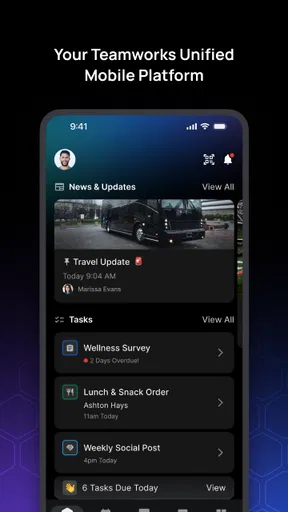
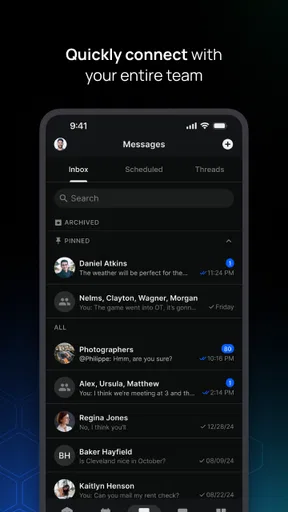
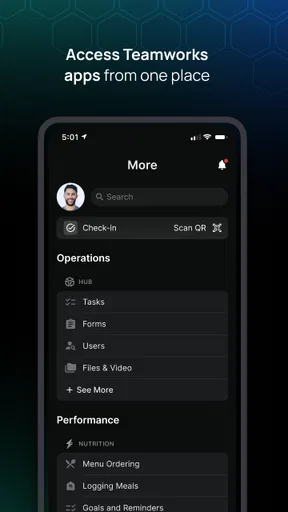
 Analysis by AppCompare
TW 2.0 is a sports app from Teamworks Innovations that feels aimed at people who want technology to support a more organized athletic routine. I approached it as a first-time user rather than someone already familiar with the Teamworks ecosystem, and that changed how I judged it. The important question is not whether the app looks impressive at first glance, but whether it helps you move from opening it to doing something useful without unnecessary confusion.
The app is free, carries a Teen content rating, and belongs to the sports category. It is listed with the short description “TW 2.0,” while its broader store summary presents it as “Elite Sports Tech.” Those phrases set an ambitious tone, but the practical experience depends heavily on what kind of access your team or sporting organization gives you. This is not the sort of sports app I would install expecting a complete replacement for every training, communication, or performance tool I already use.
Instead, I see it as a focused doorway into a structured sports environment. That distinction matters. A casual runner looking for a route planner, a fan wanting scores, or a person searching for home workouts may find more immediate value elsewhere. Someone connected to an organized athletic program is more likely to understand why this app exists and where it fits.
What to expect before you begin
The first useful expectation is that TW 2.0 is not necessarily self-explanatory from the name alone. “TW 2.0” sounds like a new version of an established platform, so a first-time user may wonder whether it is meant for individual athletes, coaches, staff, or an entire organization. My advice is to install it with the invitation or account details supplied by your team close at hand. That makes the first session much less stressful than opening it without any context.
Teamworks Innovations is the developer, and the app has passed the early adoption stage with over ten thousand installs. That is enough to show that it is being used, but it is not a reason to assume that every athlete will find the same screen or workflow. Sports technology often depends on the way an organization configures access. Your experience may therefore be shaped as much by your team’s setup as by the app itself.
I would also keep the device requirement in mind before planning a switch from an older phone. TW 2.0 requires Android twelve or newer. For most current devices that should not be a major obstacle, but anyone using an older handset should check compatibility first rather than waiting until a training day to discover that installation is unavailable.
The current version is 1.11.17, which tells me that the app is being maintained as a continuing product rather than treated as a one-off download. I still would not interpret a version number as a promise that every rough edge has disappeared. With team-oriented software, updates can improve the general app while the real usefulness still depends on whether your organization has populated it properly.
Worth Reading Before You Choose

Baby Panda World Brings Quick Play to Modern Phones, but Its Game Library Feels Busy

ESPN’s Live Game View Makes Following Close Games Easier

QuizzLand Review: A Good Fit for Short Trivia Breaks, Not Every Player

Basketball Stars: Multiplayer Is Fast, but Can It Recover When Matches Go Wrong?

WEBTOON Turns Phone Updates Into a Better Reading Routine

Link to Windows Runs on Shared Habits, Not Social Feeds
The most important thing to understand is that access and organization context are part of the experience. If you are not connected to a participating team or program, the app may not give you a meaningful reason to stay. That is not a flaw in the same way a broken menu would be, but it is a genuine limitation for independent users.
Getting through the first setup
For a smoother start, I would install TW 2.0 when you have a few quiet minutes rather than immediately before practice. Have the sign-in information or invitation message ready, and use the same identity your organization expects. A surprising amount of frustration in sports apps comes from entering a personal address when the team has registered a different one, or from creating a second account before checking whether an invitation already exists.
Once inside, take a moment to identify the main area that relates to your role. An athlete should not judge the app by looking for the same controls a coach or administrator might use. If the opening screen feels sparse, that may reflect the account’s permissions or the amount of information your organization has activated. I recommend resisting the urge to tap through every visible option at random. Look first for the item connected to your immediate task.
That task might be checking what your team expects you to do, reviewing an assigned item, or locating the place where your participation is recorded. I am deliberately describing the workflow rather than pretending every account displays identical tools. The useful habit is to start with one concrete objective, not to explore the entire product as if it were a social network.
A second setup tip is to pay attention to wording. Team platforms often use terms that make perfect sense to staff but feel unclear to a new athlete. If you see a label that sounds like a general dashboard, open it once and note what it actually contains. That small bit of orientation can save repeated searching later, especially when you are using the app while moving between classes, transport, and training.
I also suggest keeping your first session deliberately simple. Do not try to evaluate every part of the app, and do not assume that a blank area means you have done something wrong. First confirm that you can enter the account, recognize your organization, and reach the area relevant to your role. Those are the foundations for deciding whether the rest of the experience is working.
Finding your first meaningful success
The first successful action should be something that has an obvious result. In my view, that means opening the most relevant team or athlete area and completing one small piece of work connected to your current schedule. The point is not to collect taps; it is to confirm that TW 2.0 can help you answer a real question, such as what you need to do next or where your team has placed the information you were asked to review.
Choose an action that you can verify immediately. If you are checking an assigned item, make sure you can tell whether it has been opened, completed, or otherwise acknowledged. If you are reviewing information, confirm that you can return to it without starting over. This is a better first test than browsing through screens, because it reveals whether the app fits naturally into your routine.
A realistic scenario would be an athlete leaving a morning class and needing to check the day’s team expectations before heading to practice. Rather than searching through messages, notes, and separate documents, the athlete opens TW 2.0, goes to the relevant team space, finds the current item, and confirms what needs attention. Even a small reduction in that uncertainty can make the app worthwhile. The value is not dramatic; it is the quiet confidence of knowing where to look.
Another useful habit is to complete the first action while your connection is stable and you are not rushed. If something appears slow or does not update immediately, wait before repeating the action several times. Repeated taps can create doubt about whether an item was processed. A calm first session gives you a reference point for how the app normally responds on your device.
Once you have completed one meaningful action, close and reopen the relevant area later. This checks whether you can find the same information again, which is more important than simply reaching it once. A sports app earns a place in a daily routine when its useful paths become memorable. If you need to reconstruct the entire route each time, the experience will feel heavier than it should.
This is also where I would decide whether notifications or other reminders are genuinely helpful for you. If your team relies on timely updates, allowing the app to support that routine may make sense. If you already receive too many alerts, be selective about what deserves immediate attention. The best setup is not the one that produces the most activity; it is the one that helps you notice important team information without turning your phone into another source of noise.
Where first-time users can become confused
The largest source of confusion is likely to be the difference between the app itself and the way a particular organization uses it. A feature may be visible for one role and absent for another. A section may look empty because nothing has been assigned yet, not because installation failed. Before assuming that TW 2.0 is broken, I would check whether you are signed into the intended account and whether your team has told you what the app is currently being used for.
Another common mistake is treating the home screen as a complete summary of everything available. Team software often places the most important task one level deeper, especially when different users need different views. If the opening page does not immediately answer your question, try the area named for your team, schedule, assignments, or profile rather than repeatedly refreshing the same screen.
It is also easy to confuse a completed action with a merely viewed item. When you open something, look for a clear indication of what changed. If the app does not make that distinction obvious, take a screenshot or note the wording before leaving the page, then ask your team contact what counts as completion. That is a practical safeguard when attendance, preparation, or communication matters.
Privacy and role boundaries deserve some thought too. An athlete should not assume that every piece of information shown to staff will be available to them, and staff should not assume that an athlete’s view represents the whole organization. I prefer apps that make these boundaries understandable, but in a team environment some of the structure is naturally controlled outside the app. Use the account you were given and avoid sharing login details simply to help someone else get through setup.
There is a further trade-off between a dedicated sports platform and familiar alternatives such as email, group chats, shared calendars, or ordinary note apps. Those general tools are often easier to start with because everyone already knows them. They can also become messy when instructions, updates, and personal reminders are mixed together. TW 2.0 makes more sense when your organization has committed to one structured place and expects people to return to it. If your team still communicates almost entirely elsewhere, the app may feel like an extra stop rather than a simplification.
For independent athletes, a general training app may be the better choice. Those products are usually designed around personal goals and can be useful without an organization behind them. TW 2.0 is more compelling when the problem is coordination inside organized sport, not when the problem is deciding how many kilometers to run alone.
Turning one successful action into a useful routine
After the first session, I would build a small routine around moments that already exist in your day. Check TW 2.0 at a consistent point before training, then return after you have completed the relevant task. This is more reliable than opening it whenever you happen to remember. A clear trigger, such as preparing your bag or arriving at the facility, makes the app easier to adopt.
Do not try to make the app the center of your entire athletic life. Keep using the tools that genuinely serve you, but decide which information belongs in TW 2.0 and which does not. If your organization uses it for team-specific coordination, treat it as the source for that purpose. If you need detailed personal training analysis, a specialized tracker may still be stronger. The two approaches can coexist without forcing one app to do everything.
One non-obvious advantage of this focused approach is that it gives you a way to separate personal memory from team responsibility. I would use a personal note for questions I want to ask a coach, then use the team platform for the official action or information. That prevents an informal reminder from being mistaken for confirmation that the team has received something. It also helps when several people share responsibility for the same schedule.
A second useful tactic is to test the app at two different times: once when you are calm and once during a normal busy transition. If the path that felt obvious at home becomes difficult while you are heading to practice, simplify your routine and learn only the essential route. This is a realistic test of sports software. Convenience is measured under pressure, not just on a quiet sofa.
A third trade-off concerns completeness versus speed. A platform with team context can reduce scattered communication, but it may ask you to follow a more formal process than sending a quick message. That extra structure is worthwhile when everyone follows it. If only a few people use the app and the rest of the team continues with separate channels, you may spend more time checking multiple places. In that situation, ask which channel is authoritative before relying on the app for something time-sensitive.
Because the app is free, trying it does not require a purchase decision, which lowers the barrier for eligible users. Still, “free” does not mean frictionless. Your time, attention, account setup, and dependence on your organization all matter. I would judge it by whether it removes repeated uncertainty from your sports routine, not by whether it offers the largest number of visible screens.
Who should use it and who should look elsewhere
I would recommend TW 2.0 to an athlete, coach, or team member whose organization has clearly adopted it and can explain the first task to complete. It is especially suitable for someone who wants one sports-focused place to return to rather than relying on scattered messages and personal reminders. The app’s value grows when the whole group treats it as part of the normal workflow.
I would be more cautious if you are downloading it without an invitation, without a connected team, or simply because the phrase “Elite Sports Tech” sounds interesting. The store positioning may attract independent users, but the practical benefit depends on having a relevant sports context. A personal fitness app, calendar, or messaging service may be more useful if your main goal is solo training or general exercise.
I would also skip it as a primary tool if you need highly detailed personal analytics, route mapping, or a broad library of independent workouts. Those needs point toward specialized alternatives. TW 2.0 is better judged as an organized sports companion than as a universal training laboratory.
For eligible users, the path to a first success is reassuringly simple: install it on a compatible device, sign in with the identity your organization recognizes, locate the area connected to your role, complete one clearly defined action, and return later to confirm that you can find the result. If that process works and your team consistently uses the platform, the app can become a practical part of your day.
My final impression is positive but conditional. Teamworks Innovations has created a sports app that makes the most sense inside an organized program, not as a standalone download for everyone. I like the possibility of replacing scattered team information with a more deliberate workflow, and I appreciate that the free entry point makes testing straightforward. At the same time, the app cannot solve inconsistent team habits or unclear account access by itself.
TW 2.0 is worth trying when your team gives it a real job to do. Start with one task, learn the shortest route to it, and judge the app after using it during an ordinary training day rather than during a long exploratory session. If it reduces searching and keeps your team-related responsibilities in one dependable place, it earns its place on your phone. If your sporting life is entirely independent, a more personal and specialized alternative will probably serve you better.
Pros
- Simple interface makes core features easy to find.
- Runs smoothly on many older Android devices.
- Useful customization options for different user preferences.
- Quick setup lets you start using it with minimal effort.
- Regular updates can improve stability and compatibility.
Cons
- Some advanced features may require extra permissions.
- The interface can feel dated compared with newer alternatives.
- Performance may vary on devices with limited storage.
- Not all functions are equally well explained to new users.
- Support options may be limited if troubleshooting is needed.
FAQs for TW 2.0
What is TW 2.0, and what can I use it for?
TW 2.0 is an application designed to provide users with access to its core TW services and tools through a mobile-friendly interface. Depending on the version and region, it may include account access, content viewing, service management, notifications, or other interactive features. Before downloading, check the store description to confirm that its functions match your specific needs.
Is TW 2.0 free to download and use?
The availability and cost of TW 2.0 can vary depending on the platform, country, and features offered by the developer. The application may be free to install while including optional purchases, subscriptions, advertising, or services that require payment. Review the Google Play or App Store listing carefully, especially the in-app purchase section, before confirming installation.
Is TW 2.0 safe and trustworthy to install?
You should download TW 2.0 only from an official app store or a verified source connected with the developer. Before installing, check the publisher name, recent reviews, update history, requested permissions, and privacy information. Avoid modified APK files or unofficial download links, since they may contain unwanted software or expose your personal information to unnecessary security risks.
What permissions and personal information does TW 2.0 require?
The permissions requested by TW 2.0 depend on the features enabled in your particular version. It may ask for access to notifications, storage, the camera, location, or account information if those functions are necessary. Read the permission prompts instead of accepting everything automatically, and review the developer’s privacy policy to understand how collected data is stored and used.
Will TW 2.0 work on my Android or iPhone?
Compatibility depends on your device model, operating-system version, available storage, and the edition published for your region. Open the official Google Play or App Store page to see the minimum requirements before downloading. Keeping your device updated can improve performance, although older phones may experience slower loading, limited features, or occasional crashes if the application is demanding.


